Showing posts with label how to. Show all posts

Sunday, 23 November 2014

Nokia N1 release date, specs: Company's first Android tablet launches in 2015 in China

https://blogger.googleusercontent.com/img/b/R29vZ2xl/AVvXsEhrxJRFzxyUL5m7c5DFvIBN87CgQGIdEJVXusR_-q-VhSTVMM08Nl6QraEKLcqK6bFBrtjuKy673W6n1D_GRPlYQ_RTGjZI2Q0jE5baBkMPeyC9Bm3dPVevSl6nBuNZqjcyAdjXFOAoVoI/s1600/Nokia_N1_Android_concept.png
Nokia n1 tablet look
 Finnish hometown hero Nokia is trying to get back in the game as they announce the release date of Nokia N1 Android tablet in China for the first quarter of 2015. This is the part of Nokia that did not get sold to Microsoft.
http://4.bp.blogspot.com/-bQlMAfJPLcc/T3RvhVOP9tI/AAAAAAAAAqI/BMgklX8-56o/s1600/NOKIA+N1+TABLET+3.jpg
Nokia n1 tablet launched
"We are pleased to bring the Nokia brand back into consumers' hands with the N1 Android tablet, and to help make sophisticated technologies simple," said Sebastian Nyström, Head of Products at Nokia Technologies, who announced the N1 at the Slush technology conference in Helsinki.
http://www.damngeeky.com/wp-content/uploads/2014/11/Nokia-N1-tablet-PC-specifications.jpg
Nokia n1 features and specification
Reuters has dubbed the tablet an iPad look-alike, but the Finnish company says that the "simplicity and design" is something integral and well thought of, with the goal of reviving the brand.
"The N1 has a delightfully intuitive interface and an industrial design to match it. This is a great product for Nokia fans and everyone who has not found the right Android tablet yet," the company said.
The Nokia N1 specs sports a 7.9-inch laminated display and is 6.9 mm thin. Nokia N1 will also run the latest Android 5.0 Lollipop and is powered by an 64-bit 2.3GHz Intel Atom Z3580 quad-core processor.
http://i1.wp.com/www.nokiapoweruser.com/wp-content/uploads/2014/11/Jolla-vs-Nokia-N1-vs-iPad.png?resize=268%2C164
Nokia n1 tablet specification
Meanwhile, the other Nokia portion that got into the hands of Microsoft was washed out as the latter decided to drop the "Nokia" name in the Lumia brand.
http://data1.ibtimes.co.in/en/full/546030/aluminum-clad-nokia-n1-android-5-0-lollipop-unveiled-price-specifications-details.jpg?w=660&h=417&l=50&t=40
Nokia n1 tablet look
 The first Nokia-branded Android tablet will retail for $249 excl. taxes when it comes out next year. The device will be available in two colors: Lave Grey and Natural Aluminum.


http://www.ecloudtimes.com/wp-content/uploads/2014/11/Nokia-Win8-tablet.png

Dictionary Pro v4.0 - Android Paid Application Free Download


https://blogger.googleusercontent.com/img/b/R29vZ2xl/AVvXsEiOJ7wmCj3HTjQwF2dMRyshrY0VDf6l_ZlFsQS_9HWO0Kg35LMG4AmSHkguET0ha3pzrrtqcBcUpj_h8qAuq1rQfGHthLEhCs2A8IMv-7VodFUlZiMyOcEZaRD7Y02PUj8MhHme0umMjBml/s1600/Dictionary+Pro+v4.0+-+AllTypeHacks.jpg


Dictionary Pro v4.0 - Full Android Application Free Download | 2.23 MB

The Free Dictionary PRO gives you the power of the world's most comprehensive dictionary with or without Internet, and with no ads! English, Spanish, and 12 other dictionaries, all available online or offline. Translate English into more than 40 languages and access dozens of other translation options without a connection. Plus all the content of the classic app, including multiple encyclopedias, specialty dictionaries, and thesauri, all from the most trusted sources.
Developer: Farlex.

Features Of This Application:
* No advertisements.
* Extensive offline content, including a more comprehensive offline English dictionary.
* Ability to download extensive offline dictionaries for 13 other languages: Spanish, French, German, Italian, Chinese, Portuguese, Dutch, Norwegian, Greek, Arabic, Polish, Turkish, and Russian.
* Ability to download offline translations of English into more than 40 languages.
* Dozens of other offline translation options.
* Multiple English dictionaries, featuring extensive definitions, pronunciations, usage sentences, etymologies, and more.
* Advanced Search options: "Starts with," "Ends with," and "In definition."
* Multiple thesauri, featuring synonyms, antonyms, related words, even images.
* Multiple encyclopedias, including Britannica, Columbia, Collins, even Wikipedia.
* Multiple specialty dictionaries, including Medical, Legal, Financial, Idioms, Acronyms and Abbreviations, and more.
What's New:
* Full support for Android versions including KitKat, Jelly Bean, Ice Cream Sandwich, Honeycomb, and Gingerbread
* New search bar and menu design, now compatible with modern devices
* Ability to install app to SD card
* Audio pronunciation fix
* Keyboard fix for games
* Facebook and Twitter share fix
* Other bug fixes


Download Dictionary Pro v4.0 For Android Free From Bellow:


Additional information:
Updated: April 23, 2014
App Type: Books & Reference
Size: 2.23M
Installs: 10,000 - 50,000
Version: 4.0
Requires Android: Varies with device
Official Google Play Page

Lockdown Pro Premium - Android Paid Application Free Download

http://3.bp.blogspot.com/9-YzC8Jvcd6S3wth_yDAtlohOFpiJDS-H10v52JP_5R-LJnKXqLjVQXNBi-PVkI_80E=h900


Lockdown Pro Premium 2.0.5 - Full Android Application Free Download | 5.9 MB
 
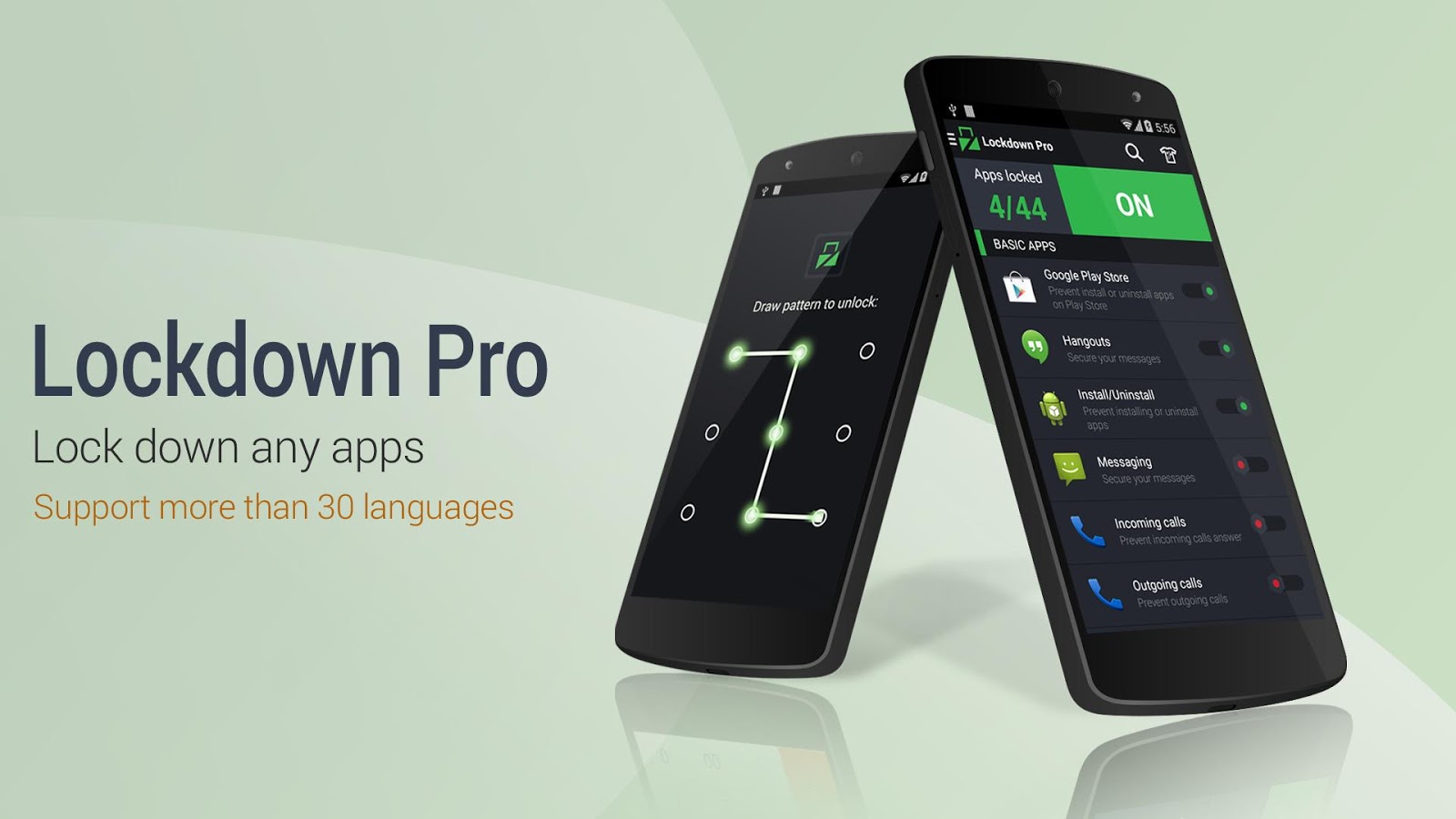
★ Lockdown Pro is the BEST applock, supporting more than 30 languages. ★ Lockdown Pro can lock any app, such as SMS, Gmail, Facebook, Whatsapp, SnapChat, Instagram, Viber, Line, Evernote, lock install/uninstall etc. ★ Lockdown Pro can hide pictures, videos (support .gif image).

Developer: AppPlus.Mobi.
Features Of This Application:
Lockdown Pro is the BEST app lock and privacy protect tool, it can lock any app, such as SMS, Gmail, Facebook, Whatsapp, SnapChat, Instagram, Viber, Line, Evernote, etc and special apps including Lock install/uninstall apps, Lock incoming calls, etc.
One-tap to lock Apps.
Taking pictures after wrong password.
Auto send email with some info and pictures of the person who wants to access your phone.
Auto lock & unlock when you get in/out your setting locations.
Auto lock & unlock when connect/disconnect with wifi.
Active lock apps with a SMS
Three password modes: Pattern Lock, Classic Lock & Calculator Lock and More.

What's New:
Support hiding images (GIF included) and videos.
Re-new user interface by material design.
Added ripple effect same as Android L.
Re-new and added more themes with ripper effect.
New feature trusted devices, support lock/unlock by smart watch.
Added instruction video reset password and turn on fake cover.
Ask for permission:
+ GET_ACCOUNTS: restore premium version when you receive app as gift
+ BLUETOOTH: use for feature trusted devices.
 

Download Mobile Number Locations Pro For Android Free From Bellow:
 
Additional information:
Updated: November 18, 2014
App Type: Tools
Size: 5.9M
Installs: 500,000 - 1,000,000
Version: 2.0.5
Requires Android: 2.3 and up
Official Google Play Page
 

X-plore File Manager Premium - Android Paid Application Free Download


https://www.mojandroid.sk/wp-content/uploads/2013/01/X-plore-File-Manager.jpeg

X-plore File Manager v3.64.00 Premium - Full Android Application Free Download | 2 MB
 
X-plore allows you to see inside of your Android device. And also outside. This is a dual-pane explorer, there are two folders shown at same time, and common operation such as copying files are done from one pane to another. And X-plore shows folder hierarchy in a tree view for clear orientation and fast switching to other location. You may explore internals of the device, and if you're power user and have your device rooted, you can make changes to system data - backup files, remove unwanted applications, etc.

 Developer: AppPlus.Mobi.

Features Of This Application: ● Dual-pane tree view


● Root, FTP, SMB, Sqlite, Picasa, Zip, Rar, 7zip explorer


● Disk Map - see which files consume most space on your disk - http://bit.ly/xp-dmap


● Cloud storage access: Google Drive™, Dropbox, Box.net, Mega.co.nz ***, OneDrive, Webdav, Yandex.disk, MediaFire, SugarSync, Dump Truck, Copy.com


● SSH File Transfer (SFTP) and SSH Shell - http://bit.ly/xp-ssh ***


● Application manager


● WiFi file sharing *** - http://bit.ly/xp-wifi


● Manage files from a PC web browser *** - http://bit.ly/xp-web


● Favorite folders


● Built-in viewers for images, video, audio, text


● Hex viewer


● Fast Image viewer with zoom and slide to previous/next images


● Thumbnails for images and video as well as for various file types (depending on associated application)


● Multi-selection - always available, yet not disturbing
● View APK files as ZIP


● Share - send files by Bluetooth, email, or whatever the device supports, from any location


● Configurable buttons and key shortcuts


● Seamless work with Zip (as if it was normal folder)

What's New:
Supporting Samsung Multi-window
Improved speed of thumbnail creation from network locations
Other small fixes.

Download X-plore File Manager For Android Free From Bellow:

                                                Download non

Additional information:
Updated: November 12, 2014
App Type: Tools
Size: 2M
Installs: 1,000,000 - 5,000,000
Version: 3.64.00
Requires Android: 2.3 and up
Official Google Play Page


SafeCopy – 3Gb of Automatic Backup Solution, Accessible Anywhere

We here at Make Tech Easier have talked about many backup options. Each one has their merits and is well worth looking into. Depending on your needs, one may be better than another. That being said, SafeCopy is another automatic backup option for your Windows or Apple machine.
The beauty of the automatic backups is you do not need to change your saving habits. The reason most people do not back up their devices regularly is because they forget or they will “do it later”. SafeCopy helps by continuously backing up your documents folder so you do not need to worry about forgetting to backup or sync your files.
http://www.cloudwards.net/wp-content/blogs.dir/1/files_mf/1349108443safecopybackuphomepage.jpg

What can you backup?

After you download the application and install it, the setup is pretty standard. You will need to go through a few steps to configure SafeCopy. You are given 3Gb of free space which won’t expire. If you need more space, paid plans are offered.
If you have less than 3Gb in your documents folder, you can select to back up the entire thing. However if you have lots of pictures, music, documents or whatever else in there, you may need to be selective. For myself, I keep pictures and music on a separate hard drive and DVD backups. Most of what is on my computer is documents and spreadsheets.

Configuring SafeCopy

The way SafeCopy saves you time is because it is pretty hands off. This dream comes through by setting SafeCopy up in a way that works for you. Configuring SafeCopy is a breeze.
When you start it up for the first time, you will be asked to either sign in or create an account.
safecopy-new-user
Next you need to select the folder(s) you’d like to backup. As you can see in the screen grab, it recommends the My Documents folder. If you would like to save only files in a specific folder, you have an option as well.
safecopy-config
The Custom option lets you drill down a more specific grouping of folders. This is great is you have a more complex organizational system than dumping everything into one folder.

Advanced settings

The advanced settings are where some of the magic happens. You set things like a hotkey combination, proxy info and the size of the files to ignore. Also on this page, you need to select how often to backup your info. I have it set to hourly, but the default is to continuously backup your the folders you selected.
safecopy-backup-frequency

After the backup

Once you have the initial backup under your belt, there isn’t a lot you need to do. Like many other backup applications, you can access your files from SafeCopy’s website. You simply login with your info.
The super cool part is, not only can you browse through the folders by clicking through folders, but you have a search option. Type in the name of the item or folder you’d like to find and voila, there it is. You can also access the search and the browse option from the desktop application.
safecopy-backup-window

Sharing files

Another good use for SafeCopy is for sharing larger files. Once backed up, you can choose to share a file by sending a link via email. You can select how long the link will work, choosing from 1 day, 1 week or unlimited. It’s like your own Mission Impossible message that self destructs.
safecopy-share

Conclusion

The ease of use (or lack there of) and layout are great. It is similar to Mozy, but offers 1Gb more space and a little more in the way of advanced settings and searching options. It didn’t seem to be a resource hog either. The search and sharing features coupled with the 3Gb of space are a step up over many other backup options.
Another perk is the iPhone app and mobile access to your files. This anywhere access is pretty important to the on-the-go users.
What do you use to safeguard your files automatically?

Sunday, 16 November 2014

Matrix Audio Editor Master v5.4.1.217 - Full version Free Download


Audio Editor Master v5.4.1.217 - Full Version Free Dwonload | 13 MB

 Audio Editor Master is a professional digital audio editor; it allows you to perform various operations with audio file: cut, copy, and paste features (with unlimited undo functionality), mix tracks, or apply effects to recordings.
This program can not only record and play sounds but also import and export a wide range of supported audio files (WAV, AIFF, MP3, and OGG, etc.).

Publisher: Metrix Audio Solution Inc.

Features Of This Software:
 Digitize a sound recording and save it as supported formats.
 Real-time visuals: bar, waveform, spectrogram, spectrum, level meter, etc.
 Record audio data from a microphone or any other available input device.
 Display a waveform window of an audio file and apply zooming.
 Edit audio files visually.
 Apply various effects.
 Apply different filters to any selected portion of audio files.
 Insert noise or silence.
 Save an audio file as the other format.
 Use markers to locate the selected part or special part of the audio data.
 Add and edit extra information to your audio files.

Download Audio Editor Master - Full Version From Bellow :


Software Details:
Version: 5 Plus
Valid Period: Unlimited
File Size: 13.5MB
Language: English
Type: Audio Editor
Supported OS: Microsoft Windows 2000/XP/2003/vista
Memory (Cache): RAM 128 megabytes (MB)
Hard disk space: Minimum 50 MB

Serial key / Crack Of This Software:
1. Install Audio Editor v5.4.1.217
2. Open The Program
3. In Main Menu Click On Register.
4. Then Register With This Details -
Name: tstar21
Serial: AEM6182540
5. Enjoy Your Full Soft.


As Google Glass launch postponed to 2015, app developers losing interest


After two years of popping up at high-profile events sporting Google Glass, the gadget that transforms eyeglasses into spy-movie worthy technology, Google co-founder Sergey Brin sauntered bare-faced into a Silicon Valley red-carpet event on Sunday.
He’d left his pair in the car, Brin told a reporter. The Googler, who heads up the top-secret lab which developed Glass, has hardly given up on the product — he recently wore his pair to the beach.
But Brin’s timing is not propitious, coming as many developers and early Glass users are losing interest in the much-hyped, $1,500 test version of the product: a camera, processor and stamp-sized computer screen mounted to the edge of eyeglass frames. Google itself has pushed back the Glass roll out to the mass market.
While Glass may find some specialized, even lucrative, uses in the workplace, its prospects of becoming a consumer hit in the near future are slim, many developers say.
Of 16 Glass app makers contacted by Reuters, nine said that they had stopped work on their projects or abandoned them, mostly because of the lack of customers or limitations of the device. Three more have switched to developing for business, leaving behind consumer projects.
Plenty of larger developers remain with Glass. The nearly 100 apps on the official web site include Facebook and OpenTable, although one major player recently defected: Twitter.
“If there was 200 million Google Glasses sold, it would be a different perspective. There’s no market at this point,” said Tom Frencel, the Chief Executive of Little Guy Games, which put development of a Glass game on hold this year and is looking at other platforms, including the Facebook-owned virtual-reality goggles Oculus Rift.
Several key Google employees instrumental to developing Glass have left the company in the last six months, including lead developer Babak Parviz, electrical engineering chief Adrian Wong, and Ossama Alami, director of developer relations.
And a Glass funding consortium created by Google Ventures and two of Silicon Valley’s biggest venture capitalists, Kleiner Perkins Caufield & Byers and Andreessen Horowitz, quietly deleted its website, routing users to the main Glass site.
Google insists it is committed to Glass, with hundreds of engineers and executives working on it, as well as new fashionista boss Ivy Ross, a former Calvin Klein executive. Tens of thousands use Glass in the pilot consumer program.
“We are completely energized and as energized as ever about the opportunity that wearables and Glass in particular represent,” said Glass Head of Business Operations Chris O’Neill.
Glass was the first project to emerge from Google’s X division, the secretive group tasked with developing “moonshot” products such as self-driving cars. Glass and wearable devices overall amount to a new technology, as smartphones once were, that will likely take time to evolve into a product that clicks with consumers.
“We are as committed as ever to a consumer launch. That is going to take time and we are not going to launch this product until it’s absolutely ready,” O’Neill said.
Brin had predicted a launch this year, but 2015 is now the most likely date, a person familiar with the matter said.
GLASS SELLING… ON EBAY
After an initial burst of enthusiasm, signs that consumers are giving up on Glass have been building.
Google dubbed the first set of several thousand Glass users as “Explorers.” But as the Explorers hit the streets, they drew stares and jokes. Some people viewed the device, capable of surreptitious video recording, as an obnoxious privacy intrusion, deriding the once-proud Explorers as “Glassholes.”
“It looks super nerdy,” said Shevetank Shah, a Washington, DC-based consultant, whose Google Glass now gathers dust in a drawer. “I’m a card carrying nerd, but this was one card too many.”
Glass now sells on eBay for as little as half list price.
Some developers recently have felt unsupported by investors and, at times, Google itself.
The Glass Collective, the funding consortium co-run by Google Ventures, invested in only three or four small start-ups by the beginning of this year, a person familiar with the statistics said.
A Google Ventures spokeswoman declined to comment on the number of investments and said the Web site was closed for simplicity. “We just found it’s easier for entrepreneurs to come to us directly,” she said.
The lack of a launch date has given some developers the impression that Google still treats Glass as an experiment.
“It’s not a big enough platform to play on seriously,” said Matthew Milan, founder of Toronto-based software firm Normative Design, which put on hold a Glass app for logging exercise and biking.
Mobile game company Glu Mobile, known for its popular “Kim Kardashian: Hollywood” title, was one of the first to launch a game on Glass. Spellista, a puzzler released a year ago, is still available, but Glu has discontinued work on it, a spokesman for the company said.
Another developer, Sean McCracken, won $10,000 in a contest last year for creating an aliens-themed video game for Glass, Psyclops, but Google never put it on the official hub for Glass apps, making it tougher to find. He has quit working on updates.
Still, there are some enthusiastic developers. Cycling and running app Strava finds Glass well-suited for its users, who want real-time data on their workouts, said David Lorsch, vice president of business development. And entrepreneur Jake Steinerman said it is ideal for his company, DriveSafe, which detects if people are falling asleep at the wheel.
PIVOTING AWAY
In April, Google launched the Glass at Work program to help make the device useful for specific industries, such as healthcare and manufacturing. So far the effort has resulted in apps that are being tested or used at companies such as Boeing and Yum Brands’ Taco Bell.
Google is selling Glass in bulk to some businesses, offering two-for-one discounts.
CrowdOptic, which uses Glass as portable computers for surgeons and other people out of offices, is currently in use at 19 U.S. hospitals and expects that to grow to 100 hospitals early next year, said Chief Executive Jon Fisher.
Alex Foster began See Through, a Glass advertising analytics firm for business, after a venture firm earlier this year withdrew its offer to back his consumer-oriented Glass fitness company when it became clear no big consumer Glass release was imminent.
“It was devastating,” he said. “All of the consumer glass startups are either completely dead or have pivoted,” to enterprise products or rival wearables.....


Android 5.0 lollipop on moto G 2014

Check out this video.....


Thanks for visiting........


Thursday, 6 November 2014

Android 5.0 Lollipop Guide: Google's Most Radical Update

We’ve steadily seen Google’s new UI concept, Material Design, make its way into our devices over the last couple of months in small KitKat updates, but the full experience is something else entirely. A number of Google’s stalwart icons and applications have been re-imagined and there’s also a host of new functions. Material Design extends to all of Google’s apps, services and products.
The full version of Google’s latest OS – which I’ve been playing with for a couple of days – is quite a radical change in terms of aesthetics and functionality.
Icons and menus have been redesigned to burst with more brightness and colour. Icons appear flat, detailed and sharp. Swiping around the menu and tapping icons triggers a splash animation that looks like you’re gently pushing your hand into a puddle.
Google wants Material Design to be an experience that smoothly segues between different applications and screens. Material Design seems to be the perfect partner for productivity apps like Google Drive and Gmail, which both benefit hugely from the redesign.
This is Google’s most user-friendly and intuitive OS yet, and the use of Google Cards suggests it has big plans for its Google Now system. Cards feature heavily in Lollipop; from lock screen notifications that can be swiped away, to how calendar events and appointments are displayed. Cards is slowly becoming the default way to interact with Android – priority information, slimmed down to its most basic form and automatically presented to you at the right time.
Battery saving....
Screenshot_2014-11-05-16-31-21
Whilst most of the new crop of smartphones have a built-in battery saving mode, stock Android devices were yet to join-in, until now. 5.0 includes a battery saving mode that automatically kicks in when your device drops to 15% battery life, which should give you an extra 90 minutes of usage.
Whilst this isn’t revolutionary – and actually quite pedestrian in comparison to HTC’s and Samsung’s power saving modes – it’s a long awaited feature that many stock Android users will welcome.
The big battery news is that Lollipop’s efficiency means that your device should last longer thanks to Android Runtime (ART), which is what Google uses to convert developer code into a functioning app.
Google spent a lot of time investigating what was killing battery and how to improve it, the result was to separate out mundane everyday app activity and tell the device not to wake for them. Developers will also be able to see what’s using up power in their app and adjust it accordingly, so we should see more power-efficient apps hitting the Play Store in the future. My initial impressions from using my Nexus 9 over the last week suggest that battery life could be less of a pressing issue with the new OS.
Reports have shown that the Nexus 5 lasts 36% longer with Lollipop installed. Upgraders can also look forward to the Nexus 6’s turbo-charging (6 hours of battery life after 15 minutes of charging) and significantly improved battery life (around 8 hours).
You can also see how long before your device is fully charged on the lock screen when your device is plugged in.
Gmail and calendar
Inbox blacked out
Inbox by Gmail doesn’t come as standard with Lollipop, that’s still invite only. But you can see how Ibox fits into the wider picture of the redesigned UI.
Gmail 5.0 now lets you sync up multiple accounts at once (Yahoo! and Outlook), effectively making Gmail a one-stop-shop email client. So you’ll never have to use multiple email clients to access different accounts ever again.  To add extra email accounts, go to the Gmail app and press the drop down menu on the left-hand side. From there select ‘Add account’ and follow the setup instructions.
One of the major updates is to how well Gmail syncs with your calendar. Gmail will now automatically input calendar appointments into your diary based on emails you’ve received. So you if buy concert tickets or receive an e-boarding pass, Gmail will scan that info and make a calendar appointment.
Screenshot_2014-11-05-15-00-34
Manually entering calendar details has been improved too. The new Assists feature suggests names, times and places when you enter a new diary entry based on your email threads and content.
The new schedule view (above) is part of Google’s attempt to make Cards a bigger part of the Android experience. Appointments are now displayed as one long continuous scrollable card to make it easier to see upcoming entries. You can switch into schedule view by hitting the settings menu in the Calendar app in the top right-hand corner.
Multiple accounts
Screenshot_2014-11-05-15-04-33
It’s now possible to add multiple accounts to Lollipop, including guest accounts for temporary use. This new security feature means that you can avoid someone viewing your personal emails or texts, and you won’t have to worry about your configurations being messed about it with. It also means the kids won’t be able to accidently delete anything important.
There are three types of accounts that you can set up on Lollipop. First the user account, which has full access to settings and apps. Second there’s the guest account, which happen in sessions and anything done in this time isn’t recorded or saved. Finally, there’s the profile account, which lets the main user restrict how the device is used – disabling certain apps for example. You can also restrict phone calls and texts from other users if you want to keep that information private.
Whilst secondary users can download their own apps and customise their profile how they want, any changes to settings made by the main user will affect all users of the device.
You can quickly add new accounts by touching the profile icon in the top right-hand corner of the lock-screen, or by going into the main settings menu. If you want to add restrictions and manage each account, go to the main settings menu and select ‘Users’.
Smart lock
IMG_9317
Google demoed its new Smart Lock feature at Google I/O in June and it’s now available in Lollipop. Essentially, Smart Lock allows bluetooth enabled devices to unlock anything when it gets within signal. For example, your Nexus 6 will detect that your Motorola 360 is nearby and recognise that it’s a trusted device, which means you won’t have to enter your passcode to unlock it. It also works on Chromebooks or desktops running Chrome OS.
To set Smart Lock up, go to Settings> Security> Smart Lock. You’ll first need to set up screen lock (in the same settings menu) before you can start using Smart Lock.
Notifications
Screenshot_2014-11-03-11-13-03
Your notifications have been redesigned to be less intrusive – Google wants to keep you informed without interrupting your workflow. Phone calls and text messages won’t take over the entire display, instead they’ll appear at the top of your device with an option to either ignore or action.
Lock screen notifications are also actionable without having to properly wake the device or go into a specific app. If you’re concerned about private notifications flashing up on your lock screen, you can turn this off by going into Settings>Sound & Notifications. You can then select whether you want to turn it off, show all or hide sensitive notification content.
Apps and games that continually pester you with spam notifications can now be silenced, too. In the same Sound & Notifications menu, select ‘App notifications’ and chose the apps that are bothering you. Within that menu you can either block notifications altogether or only allow priority notifications through.
One of the best new notification features is the ‘Interruptions’ option, which lets you set when you do and don’t want to be bothered. Whilst this has been a long standing feature for other systems and devices, it’s a long time coming and welcome feature on stock Android. To manage notifications, go to Settings> Sounds & Notifications> Interruptions.
Screenshot_2014-11-05-12-36-32
From this menu, you can set how long you don’t want to be interrupted for (hours or days) and specific start times. You can also turn set which priority interruptions can get through the temporary blackout, whether they’re reminders, messages or calls.
When will I get it?
Lollipop will ship with the Nexus 9 and Nexus 6, which you can pre order now. Nexus 4,5, 7 and 10 users should see an update coming in the next few weeks, however there are reports of a delay.
HTC told me that it’s “committed to rolling out Android 5.0 90 days after the software becomes available” to its list of recent flagship devices. Sony has promised to rollout Lollipop to its entire Z series in early 2015. Motorola, which prides itself of quick update releases, will be bringing Lollipop to its Moto X, G, E and Droid series – although it’s not sure on when...

Android Lollipop Hit By Big Battery Life Problem

 On Monday Google GOOGL -1.46% announced the launch of Android 5.0 Lollipop. The company is known for its gradual roll-outs, but with no Nexus 4, 5, 7 or 9 yet to update the frustration has been growing. Now we know why: Lollipop has problems.
Android Police got wind earlier today that a WiFi bug in the final build of Lollipop is dramatically impacting battery life. This was backed up by mass reports of the problem in the official Android Developer Forum which were quickly fused into a single thread that is now over 800 posts long.
Google Android Senior Developer Trevor Johns ultimately chimed inconfirming that:
“Android Engineering is aware of an issue affecting Nexus 5 users running Android 5.0 which causes significant “Miscellaneous” battery usage while WiFi is enabled. This appears to be caused by an abnormally high number of IRQ wakeup events. We are continuing to investigate this issue.”
Android Lollipop WiFi bug causes dramatic battery drain (image courtesy of Android Developer Preview)
Android Lollipop WiFi bug causes dramatic battery drain 
       (image courtesy of Android Developer Preview)
Johns’ welcome candour confirms Google doesn’t yet have a fix for the bug and the many uploaded screenshots to the thread (some samples above) show “significant” is an apt description with Nexus 5 testers showing a full battery is lasting 4 hours or less.
Other testers have noted that disabling WiFi eliminates the problem, but this is hardly a practical solution for a mass roll out.
Google has yet to confirm whether the bug impacts other Nexus smartphones and tablets and whether that means they will get their Lollipop updates ahead of the Nexus 5 remains to be seen. Either way it seems the new Nexus 6 phablet and Nexus 9 tablet are unaffected, with both devices shipping.
Android Lollipop is vital for Google and its Material Design interface will be used across all Google services

Of course the last thing Google needs right now is to release Android 5.0 full of bugs. Apple AAPL +0.24% hadproblem after problem with iOS 8 which it is only now fully resolving and Google will be loathe to waste the opportunity to contrast that with a slick Lollipop release, particularly if it only costs a few more days to get it right.
November 12 is now pegged as the day when legacy Nexus devices will receive Lollipop, but this could easily change. On the bright side it shouldn’t make a major difference to non-Nexus devices which have a longer wait in any case...
 

Android 5.0 Lollipop OTA updates delayed due to WiFi bug

Android 5.0 Lollipop apparently has a WiFi bug that is 
draining users' batteries. The issue was first spotted on the 
                                      Nexus 5


Google has just run into a big stumbling block with the Android 5.0 Lollipop update. According to reports, the OTA updates for the Nexus devices have been delayed because of a WiFi bug in Android 5.0 that is draining the battery of the devices.
Android 5.0 Lollipop had started rolling out to devices some days ago, but it seems that the updates have been stopped because of this issue. The Nexus 4, Nexus 5, Nexus 7 (2012 and 2013) and Nexus 10 will be the first devices to get the update. Google has itself confirmed the bug on its Bug Tracker page as well.
Users ran into the issue on the Nexus 5 first and the Bug Tracker page is filled with queries about the same. That said, it's not yet confirmed whether the WiFi tracking bug is the cause for the battery drain, but both the bug and the issue exist in Lollipop.
Google had said in its I/O conference back in June that the Lollipop update would bring better battery life to Android smartphones, along with the battery saver feature. Many smartphone makers have already confirmed the update on their various devices, but the discovery of this bug may delay their plans as well.....

Thanks for visiting.........